Billing and credit management
Seqera Compute environments and Co-Scientist share a credit pool at the organization level. Each user also receives a monthly Co-Scientist allowance based on their plan. Once a user exhausts their allowance, further Co-Scientist usage draws from the shared pool. Compute credits are deducted from the shared pool in real time at task completion.
One Seqera credit equals $1 USD. Compute resources are charged at AWS on-demand rates for the selected region, with transparent pass-through pricing.
How billing works
Real-time credit deduction
- Task-level billing (Compute): Credits are deducted as each pipeline task completes, providing real-time visibility into run costs. Credit spend for running Studio sessions updates at regular intervals.
- Per-inference billing (Co-Scientist): Once your monthly included allowance is consumed, credits are deducted per AI inference call. Usage under the included allowance is not charged.
- Cost aggregation: The usage report shows aggregated compute and memory costs per workflow or Studio session.
Compute resources
Seqera Compute bills for four resource types:
| Resource | Rate (credits) | Billing unit | Based on | Billing frequency | Details |
|---|---|---|---|---|---|
| CPU time | 0.1 | CPU-hour | Requested vCPUs × runtime | At task completion | Charged based on requested vCPUs |
| Memory | 0.025 | GB-hour | Requested memory × runtime | At task completion | Charged based on requested memory. If tasks request no memory, peak memory at task completion is charged (minimum 2 GB per task). |
| Storage | 0.025 | GB-month | Actual usage | Daily reconciliation | S3 storage costs at AWS rates, varies by region |
| Network transfer | Varies by region | GB | Actual data transfer | Daily reconciliation | Data egress charges at AWS rates. Network charges reflect in billing reports after 48 hours. |
CPU and memory are billed based on requested resources in your pipeline configuration, not actual usage. Storage and network costs are billed based on actual consumption.
Co-Scientist usage
Co-Scientist follows a tiered billing model:
- Included usage: Each plan includes a monthly allowance of Co-Scientist usage. Usage within this allowance is not charged. The included allowance resets monthly.
- Credit overage: Usage above the included allowance is billed against your organization's credit balance, deducted per AI inference call.
The Credit usage dialog in Co-Scientist shows your usage on both tiers — included usage with a monthly progress bar, and remaining org credits with the credit expiration date. When included usage is exhausted, requests automatically continue to draw from credits if available.
Co-Scientist usage is tracked per workspace. Your organization administrator can review per-workspace AI consumption alongside compute spend in the workspace Settings.
Billing example: pipeline run
The nf-core/rnaseq pipeline is run on a Seqera Compute environment with a test dataset as input. The following run metrics are recorded at workflow completion:
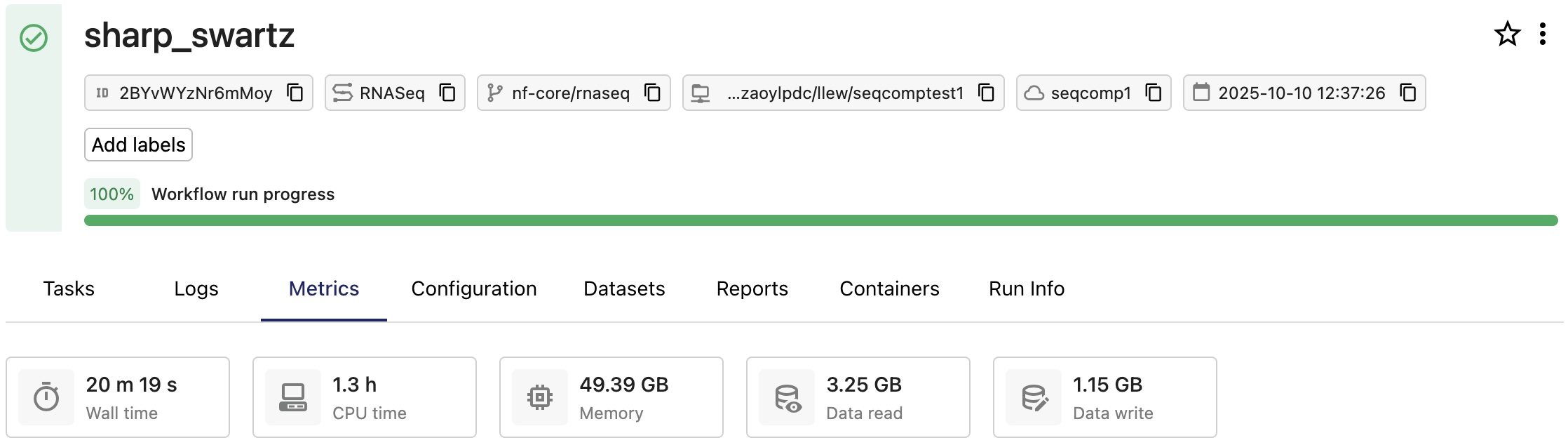
To calculate the credit spend for this run, the vCPUs and memory requested for each task are multiplied by task runtime:
| Task | Duration | CPUs | Memory |
|---|---|---|---|
| PREPARE_GENOME:GUNZIP_ADDITIONAL_FASTA (gfp.fa.gz) | 3 m 28 s | 1 | 6.0 GB |
| PREPARE_GENOME:UNTAR_SALMON_INDEX (salmon.tar.gz) | 3 m 28 s | 1 | 6.0 GB |
| PREPARE_GENOME:GUNZIP_GTF (genes_with_empty_tid.gtf.gz) | 3 m 28 s | 1 | 6.0 GB |
| RNASEQ:FASTQ_QC_TRIM_FILTER_SETSTRANDEDNESS:CAT_FASTQ (WT_REP1) | 3 m 29 s | 1 | 6.0 GB |
| RNASEQ:FASTQ_QC_TRIM_FILTER_SETSTRANDEDNESS:FQ_LINT (WT_REP2) | 3 m 29 s | 2 | 12.0 GB |
| RNASEQ:FASTQ_QC_TRIM_FILTER_SETSTRANDEDNESS:FQ_LINT (RAP1_UNINDUCED_REP1) | 3 m 29 s | 2 | 12.0 GB |
| RNASEQ:FASTQ_QC_TRIM_FILTER_SETSTRANDEDNESS:CAT_FASTQ (RAP1_UNINDUCED_REP2) | 3 m 29 s | 1 | 6.0 GB |
| RNASEQ:FASTQ_QC_TRIM_FILTER_SETSTRANDEDNESS:FQ_LINT (RAP1_IAA_30M_REP1) | 3 m 29 s | 2 | 12.0 GB |
| PREPARE_GENOME:GTF_FILTER (genome.fasta) | 47 s | 1 | 6.0 GB |
| FASTQ_FASTQC_UMITOOLS_TRIMGALORE:FASTQC (WT_REP2) | 46 s | 4 | 15.0 GB |
The Tasks tab of the run details page lists the processes and tasks executed during the run. Select a task from the list to view the task's details, including metrics for Execution time and Resources requested.
The usage report for this run shows the CPU and memory cost as separate line items:
| Date | WorkflowId | WorkspaceId | Region | ProductName | UnitPrice(USD) | Quantity | Total(USD) |
|---|---|---|---|---|---|---|---|
| 2025-10-10 | 2BYxxxxxxxMoy | 1884xxxxxxx2036 | us-east-2 | Cpu Hours | 0.1 | 1.3255897223 | 0.13255897223 |
| 2025-10-10 | 2BYxxxxxxxMoy | 1884xxxxxxx2036 | us-east-2 | Memory Gb | 0.025 | 5.514970833333334 | 0.13787427083333334 |
This run consumed approximately 0.27 credits, for a total cost of $ 0.27 (USD).
Credit management
Credit balance and spend overview
- Navigate to your organization or workspace Settings tab to view credit balance and spend information, request more credits, and download usage reports.
- Select Usage overview in the top navigation bar to view real-time run, Studio, user, and credit usage information for your workspace. Select Details to navigate to workspace Settings.
- In Co-Scientist, the Credit usage dialog shows monthly included usage alongside available org credits, so you can see at a glance whether you're consuming included allowance or drawing from credits.
Usage report
From your organization or workspace Settings tab, select Download report in the Credits section to download a usage report in CSV format. The report is structured as follows:
| Date | WorkflowId | WorkspaceId | Region | ProductName | UnitPrice(USD) | Quantity | Total(USD) |
|---|---|---|---|---|---|---|---|
| 2025-10-10 | 2BYxxxxxxxMoy | 1884xxxxxxx2036 | us-east-2 | Cpu Hours | 0.1 | 1.3255897223 | 0.13255897223 |
| 2025-10-10 | 2BYxxxxxxxMoy | 1884xxxxxxx2036 | us-east-2 | Memory Gb | 0.025 | 5.514970833333334 | 0.13787427083333334 |
The report includes:
- Separate line items for compute and memory per workflow or Studio session
- Aggregated costs (not individual task breakdowns)
Request additional credits
To request more credits:
- Select Request more credits in the organization or workspace settings Credits view.
- Complete the form with your contact, organization, and credit request details.
- Credits are typically allocated within one business day.
Request credits online or contact your Seqera account manager for assistance.
Credit limits and service suspension
When your organization or workspace credit balance is exhausted, all credit-billable services are affected:
- Running pipelines paused: All active pipeline runs and Studio sessions are automatically suspended.
- Seqera Compute buckets locked: Data can no longer be browsed or downloaded from Data Explorer.
- New launches blocked: No new pipeline runs or Studios can be started using Seqera Compute environments.
- Co-Scientist requests blocked: Once both your included monthly AI usage and your org credit balance are exhausted, new requests are blocked until credits are added.
- Resume runs manually: After purchasing additional credits, manually resume paused pipelines.
Long-running tasks are periodically monitored. If a single task's estimated cost would exceed remaining credits, the workflow is preemptively paused.